
Dashboard Overview
Your server control center - real-time stats and quick actions
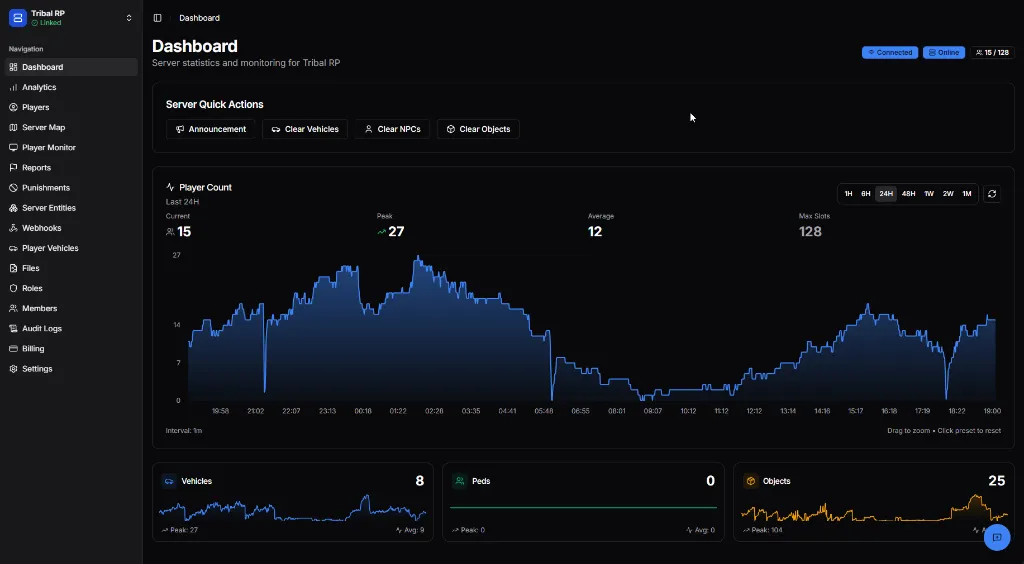
The Dashboard is your central hub for monitoring and managing your FiveM server in real-time.
Connection Status
Section titled “Connection Status”At the top right, you’ll see your server’s connection status:
| Indicator | Meaning |
|---|---|
| 🟢 Connected | Server is linked and communicating |
| 🟢 Online | Server is running |
| 53 / 128 | Current players / Max slots |
Player Count Graph
Section titled “Player Count Graph”The main graph shows player count over time with multiple viewing options:
- Time ranges: 1H, 6H, 24H, 48H, 1W, 2W, 1M
- Current: Live player count
- Peak: Highest count in selected period
- Average: Mean player count
- Max Slots: Your server’s capacity
Tip: Drag on the graph to zoom into a specific time range. Click “Click preset to reset” to return to the full view.
Server Quick Actions
Section titled “Server Quick Actions”Quick access to common server management tasks:
| Action | Description |
|---|---|
| 📢 Announcement | Broadcast a message to all online players |
| 🚗 Clear Vehicles | Remove unoccupied or all vehicles |
| 👤 Clear NPCs | Delete all NPCs from the server |
| 📦 Clear Objects | Remove spawned objects |
See Quick Actions for detailed usage.
Entity Counts
Section titled “Entity Counts”At the bottom, three cards show real-time entity statistics:
Vehicles
Section titled “Vehicles”- Current count of spawned vehicles
- Peak and average values
- Historical graph
Peds (NPCs)
Section titled “Peds (NPCs)”- Current NPC count on server
- Useful for performance monitoring
Objects
Section titled “Objects”- Spawned props and objects
- Peak values help identify cleanup needs
Navigation Sidebar
Section titled “Navigation Sidebar”Access all MonoAdmin features from the left sidebar:
| Section | Purpose |
|---|---|
| Dashboard | Server overview (this page) |
| Analytics | Detailed server statistics |
| Players | View and manage players |
| Server Map | Live player positions |
| Player Monitor | Real-time player tracking |
| Reports | Player tickets and reports |
| Punishments | Bans, kicks, and warnings |
| Server Entities | Vehicles, peds, objects |
| Server Logs | Discord/API integrations |
| Player Vehicles | Vehicle ownership data |
| Files | Server file management |
| Roles | Staff role configuration |
| Members | Team member management |
| Audit Logs | Action history |
| Billing | Subscription management |
| Settings | Project configuration |
Next Steps
Section titled “Next Steps”- Quick Actions — Learn about server announcements and cleanup tools
- Players — Managing player data and actions