
Server Logs
Configure outward-bound notifications for server events using Discord or custom endpoints.
Webhooks allow you to send real-time data from your FiveM server to external services like Discord, or your own custom API endpoints.
Webhook Logs
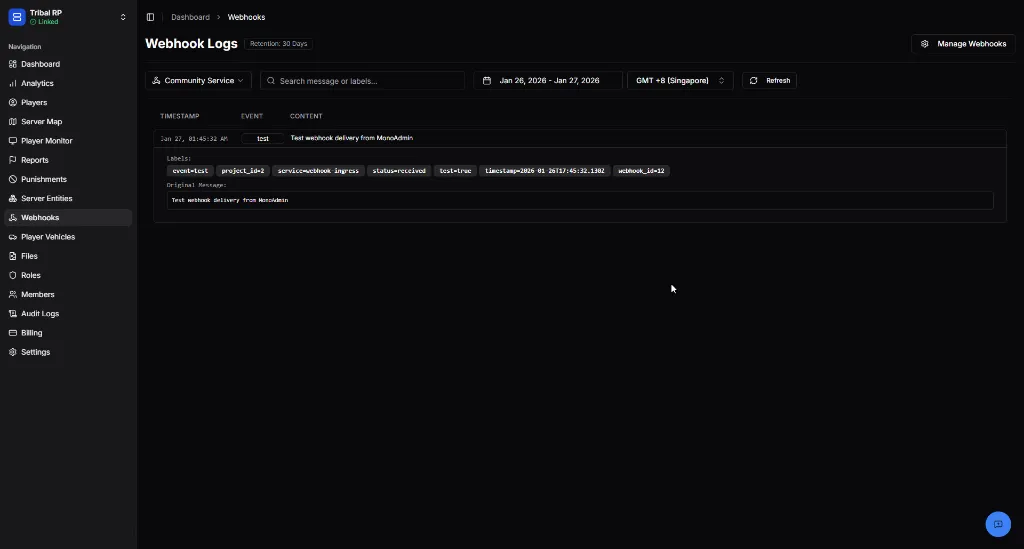
Section titled “Webhook Logs”The Webhook Logs page provides a detailed audit trail of every delivery attempt made by the system.
Log Details
Section titled “Log Details”Logs are retained for 30 days. Each entry includes:
| Field | Description |
|---|---|
| Timestamp | The exact time the delivery was attempted. |
| Event | The type of trigger (e.g., test, playerJoin, punishment). |
| Content | A snippet of the message or payload sent. |
| Labels | Metadata tags including Project ID, Webhook ID, and delivery status. |
You can click on any log entry to view the Original Message payload in its raw format, which is helpful for debugging custom integrations.
Managing Webhooks
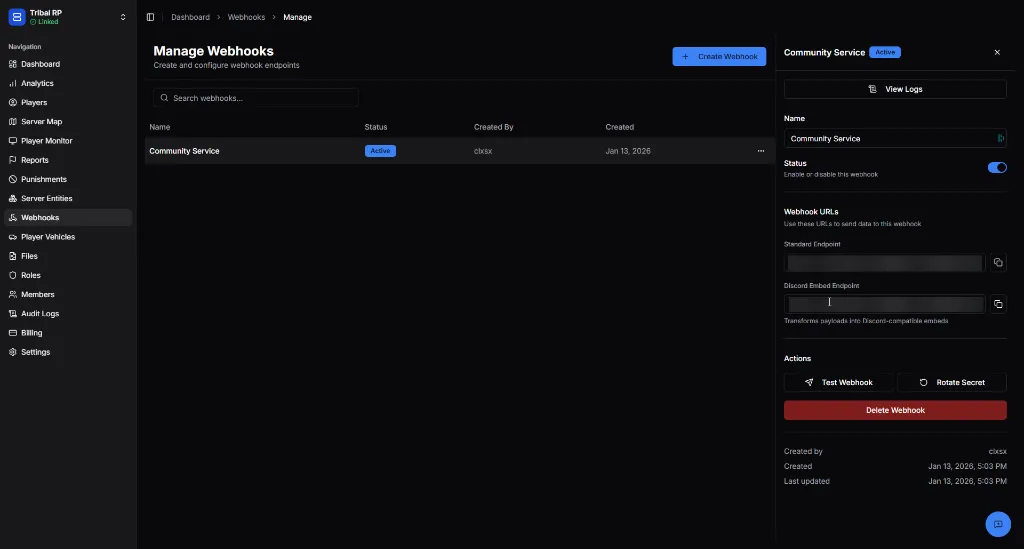
Section titled “Managing Webhooks”Click the Manage Webhooks button in the top right of the logs page to create or configure your endpoints.
Configuration Options
Section titled “Configuration Options”When creating or editing a webhook, you can configure the following:
- Name — A descriptive label for the webhook (e.g., “Discord Staff Alerts”).
- Status — A toggle to quickly enable or disable the endpoint without deleting it.
Webhook Endpoints
Section titled “Webhook Endpoints”monoAdmin provides two distinct types of endpoints:
| Endpoint Type | Purpose |
|---|---|
| Standard Endpoint | Sends a standard JSON payload. Best for custom APIs and developer integrations. |
| Discord Endpoint | Automatically transforms payloads into rich Discord embeds. Ideal for logging server events directly to Discord channels. |
Standard Endpoint
Section titled “Standard Endpoint”POST /webhook/{secret}Content-Type: application/jsonAccepts JSON payloads with the following fields:
| Field | Type | Required | Description |
|---|---|---|---|
event | string | ✅ | Event name, becomes a Loki label for filtering. |
message | string | ✅ | The log message content. |
| additional fields | any | ❌ | Extracted as Loki labels for advanced filtering. |
Example Request:
{ "event": "player_ban", "message": "Player banned for cheating", "player_id": "12345", "admin": "StaffMember", "duration": "7d"}Responses:
| Status | Description |
|---|---|
200 OK | Payload received and logged successfully. |
400 Bad Request | Invalid payload (missing event or message). |
401 Unauthorized | Invalid webhook secret. |
403 Forbidden | Webhook is disabled. |
429 Too Many Requests | Rate limit exceeded. |
Discord Endpoint
Section titled “Discord Endpoint”POST /webhook/{secret}/discordContent-Type: application/jsonThis endpoint supports two payload formats and returns a Discord-compatible response body.
Format 1: Discord-Native Passthrough
Section titled “Format 1: Discord-Native Passthrough”Pass Discord’s native content and/or embeds fields directly. These are forwarded as-is.
{ "content": "Server is now online!", "embeds": [ { "title": "Server Status", "description": "All systems operational", "color": 5763719 } ]}Format 2: Transform Format
Section titled “Format 2: Transform Format”Use event and message fields to have monoAdmin automatically generate a Discord embed.
| Field | Type | Required | Description |
|---|---|---|---|
event | string | ✅ | Becomes the embed title and Loki label. |
message | string | ✅ | Becomes the embed description. |
| additional fields | any | ❌ | Added as inline embed fields. |
{ "event": "player_ban", "message": "Player banned for cheating", "player_id": "12345", "admin": "StaffMember", "duration": "7d"}This generates an embed with player_ban as the title, the message as the description, and player_id, admin, duration as inline fields.
Responses:
The response body contains the Discord-formatted payload for verification:
| Status | Description |
|---|---|
200 OK | Returns the generated Discord embed body. |
400 Bad Request | Missing required fields (event/message or content/embeds). |
401 Unauthorized | Invalid webhook secret. |
403 Forbidden | Webhook is disabled. |
429 Too Many Requests | Rate limit exceeded. |
FiveM Lua Examples
Section titled “FiveM Lua Examples”Use PerformHttpRequest to send webhook payloads from your FiveM server scripts.
Standard Endpoint:
local webhookUrl = "https://your-monoadmin-url.com/webhook/your-secret-here"
PerformHttpRequest(webhookUrl, function(statusCode, response, headers)    if statusCode == 200 then        print("[Webhook] Sent successfully")    else        print("[Webhook] Failed with status: " .. tostring(statusCode))    endend, "POST", json.encode({    event = "player_ban",    message = "Player banned for cheating",    player_id = "12345",    admin = "StaffMember",    duration = "7d"}), {    ["Content-Type"] = "application/json"})
Discord Endpoint (Transform Format):
local discordWebhookUrl = "https://your-monoadmin-url.com/webhook/your-secret-here/discord"
PerformHttpRequest(discordWebhookUrl, function(statusCode, response, headers)    if statusCode == 200 then        print("[Discord Webhook] Sent successfully")    else        print("[Discord Webhook] Failed with status: " .. tostring(statusCode))    endend, "POST", json.encode({    event = "server_restart",    message = "Server restarting for scheduled maintenance",    scheduled_by = "Admin",    downtime = "5 minutes"}), {    ["Content-Type"] = "application/json"})
Discord Endpoint (Native Passthrough):
local discordWebhookUrl = "https://your-monoadmin-url.com/webhook/your-secret-here/discord"
PerformHttpRequest(discordWebhookUrl, function(statusCode, response, headers)    if statusCode == 200 then        print("[Discord Webhook] Sent successfully")    else        print("[Discord Webhook] Failed with status: " .. tostring(statusCode))    endend, "POST", json.encode({    content = "🟢 Server is now online!",    embeds = {        {            title = "Server Status",            description = "All systems operational",            color = 5763719        }    }}), {    ["Content-Type"] = "application/json"})
Actions
Section titled “Actions”The management panel includes tools to test and secure your webhooks:
- Test Webhook — Sends a test payload to the configured URL to verify connectivity.
- Rotate Secret — Generates a new signing secret. Use this if you believe your webhook security has been compromised.
- Delete Webhook — Permanently removes the webhook and stops all associated deliveries.
Always protect your Webhook URLs and Secrets. Anyone with access to these can send data to your endpoints or impersonate monoAdmin deliveries.