
Server Map
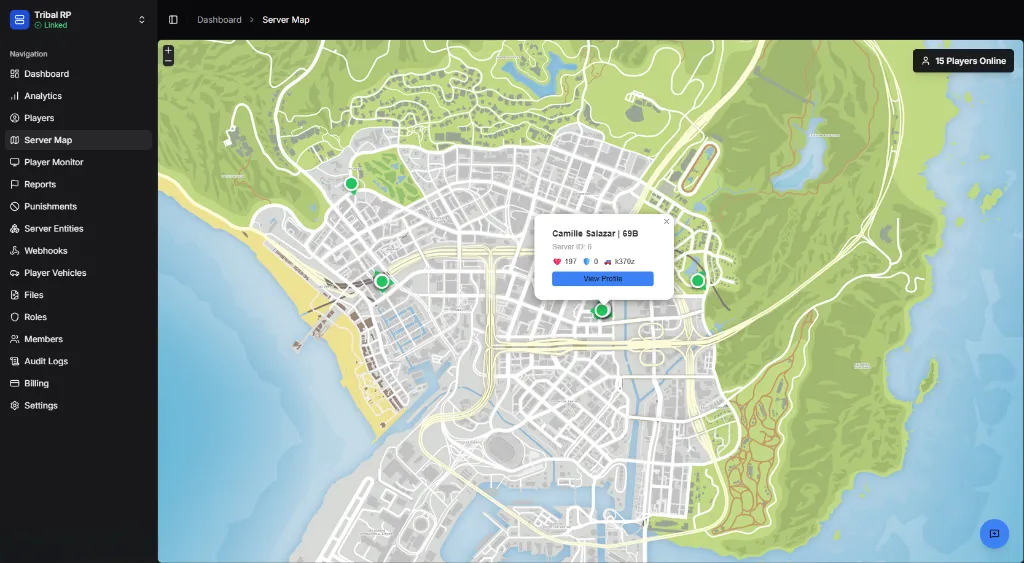
Live map showing all online players and their positions
The Server Map provides a real-time bird’s eye view of all players on your server.
Overview
Section titled “Overview”The map displays the full game world with live player markers showing where everyone is located. This is useful for:
- Monitoring player activity — See where players are congregating
- Finding players — Locate specific players quickly
- Event management — Track player movement during events
- Staff oversight — Monitor for suspicious behavior patterns
Player Markers
Section titled “Player Markers”Each green dot represents an online player. Click any marker to see:
| Field | Description |
|---|---|
| Name | Player’s display name |
| Server ID | Current session ID |
| Health | Current health (❤️ 197) |
| Armour | Current armour (🛡️ 0) |
| Vehicle | Current vehicle if any (🚗 k370z) |
| View Profile | Link to full player profile |
Map Controls
Section titled “Map Controls”| Control | Action |
|---|---|
| Scroll | Zoom in/out |
| Drag | Pan around the map |
| Click marker | View player info popup |
Player Count
Section titled “Player Count”The top-right badge shows the current online player count (e.g., 15 Players Online).
Use Cases
Section titled “Use Cases”Staff Monitoring
Section titled “Staff Monitoring”- Identify players gathering in unusual locations
- Track player movement during reports
- Verify player locations for teleport requests
Event Coordination
Section titled “Event Coordination”- Monitor event participation
- Track race progress
- Coordinate large-scale events
Community Management
Section titled “Community Management”- Identify popular hangout spots
- Plan new content based on player patterns
- Monitor for potential issues (large gatherings, remote areas)