
Player Monitor
Live screen capture of players for real-time monitoring
The Player Monitor provides live screen captures of players, allowing staff to observe gameplay in real-time without being in-game.
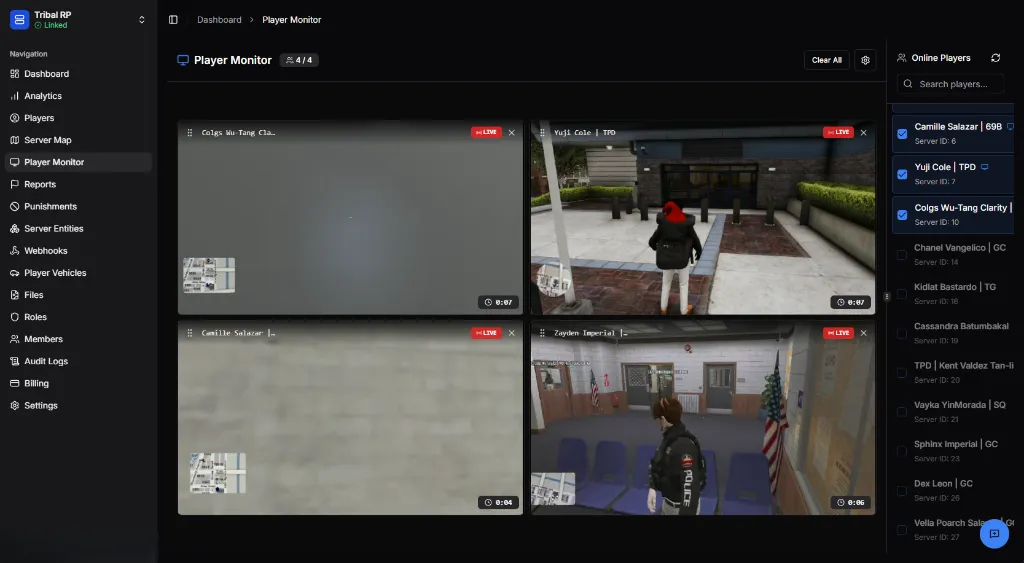
Overview
Section titled “Overview”Monitor up to 16 players simultaneously with live screen captures. Each feed shows what the player sees in real-time, making it perfect for:
- Investigating reports — Watch suspected rule breakers
- Staff training — Observe how players interact
- Event monitoring — Watch key players during events
- Quality assurance — Verify gameplay experience
Feed Display
Section titled “Feed Display”Each player feed shows:
| Element | Description |
|---|---|
| Player name | Display name at top of feed |
| 🔴 LIVE badge | Indicates active stream |
| Minimap | Player’s in-game map position |
| Timer | Duration watched (bottom right) |
| Close button | Remove player from monitor (X) |
Adding Players
Section titled “Adding Players”Use the Online Players panel on the right to add players:
- Search by name using the search bar
- Click the checkbox next to a player’s name
- The player appears in an available feed slot
The header shows current count (e.g., 4/4 = 4 of 4 slots used).
Controls
Section titled “Controls”| Button | Function |
|---|---|
| Clear All | Remove all players from monitor |
| ⚙️ Settings | Configure monitor options |
| 🔄 Refresh | Refresh the player list |
Monitor Settings
Section titled “Monitor Settings”Click the ⚙️ Settings icon to configure the monitor.
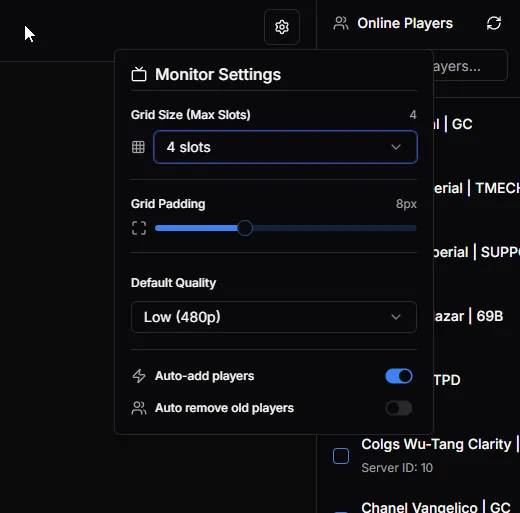
| Setting | Description |
|---|---|
| Grid Size (Max Slots) | Number of player feeds (1-4 slots) |
| Grid Padding | Space between feeds (adjustable slider) |
| Default Quality | Stream quality: Low (480p), Medium, High |
| Auto-add players | Automatically add new players to empty slots |
| Auto remove old players | Remove players who disconnect |
Player List
Section titled “Player List”The right panel shows all online players:
- Checkbox — Selected players being monitored
- Player name — Display name and group
- Server ID — Current session ID
- 🔵 Icon — Player has active feed
Best Practices
Section titled “Best Practices”- Limit monitoring — Focus on 1-2 players for detailed observation
- Use for investigations — Don’t monitor without reason
- Document findings — Screenshot anything relevant
- Respect privacy — Only monitor when necessary for staff duties
- Combine with reports — Use alongside player reports for context
Requirements
Section titled “Requirements”Player Monitor requires:
- Active server connection
- Players running compatible FiveM client
- Sufficient bandwidth for live streams